Section 8: Coding Fundamentals & AI Co-Pilots
M1S8: Coding Fundamentals & AI Co-Pilots
The gap between Excel proficiency and programming capability has collapsed. A year ago, transitioning from spreadsheets to code required months of syntax memorization and debugging frustration. Today, AI co-pilots transform natural language instructions into working code, enabling real estate analysts to automate portfolio reports, scrape market data, and build valuation models without memorizing programming languages. This shift represents not just a tool upgrade but a fundamental change in how analytical work gets done.
Real estate firms generate thousands of property reports monthly, each requiring data extraction, calculation, and formatting. Manual Excel workflows that consume days can now be automated in hours through code, even by analysts who have never written a line of Python. The transformation happens through understanding procedural thinking rather than syntax proficiency. Code executes instructions sequentially, like following a recipe, while Excel formulas calculate simultaneously across cells. This mental shift matters more than memorizing commands.
Understanding Code as a Tool
Programming languages organize instructions that computers execute to transform data. Unlike Excel formulas that live in cells, code creates reusable scripts that process any dataset following the same logic. This distinction enables scale and consistency that manual methods cannot achieve.
Consider monthly rent roll analysis for a 500-unit apartment portfolio. In Excel, you manually import tenant data, create pivot tables, calculate occupancy metrics, and format reports. Each month requires repeating these steps, risking errors from manual manipulation. Code automates this entire workflow: import data from property management systems, calculate metrics using predefined logic, generate formatted reports, and email results to stakeholders. The script runs identically every month, eliminating variation and freeing analysts for strategic work rather than repetitive tasks.
The core programming concepts apply universally across languages. Variables store information like property addresses or rental rates, similar to named ranges in Excel. Conditional logic (IF/THEN statements) filters properties meeting investment criteria, just like Excel’s IF function but handling complex multi-step decisions. Loops process multiple properties without copying formulas down thousands of rows. Functions package reusable calculations, like computing cap rates or IRR, that work consistently across projects.
Excel Cell Formula:
=IF(AND(C2>1000000,C2<2000000),C2*0.08,"Not Eligible")Python Equivalent:
if 1000000 < property_value < 2000000:
    cap_rate = property_value * 0.08
else:
    cap_rate = "Not Eligible"
Both approaches filter properties between $1M-$2M and calculate 8% cap rates, but Python handles complex logic more clearly and scales to thousands of properties without performance issues.
Programming errors provide explicit feedback that Excel often obscures. When a calculation fails, error messages identify the exact line and problem type. This precision accelerates learning compared to hunting for circular references or debugging nested formulas across multiple worksheets. What seems intimidating actually provides clearer guidance than cryptic #REF! errors.
AI Co-Pilots for Real Estate Professionals
AI co-pilots represent a new category of development tools that generate, explain, and debug code through conversation. GitHub Copilot, ChatGPT, Claude, and Google Gemini each offer distinct capabilities for transforming analytical ideas into working programs. These tools understand context, suggest solutions, and explain complex concepts in plain language.
GitHub Copilot integrates directly into code editors, suggesting completions as you type. It reads your project structure, understands naming conventions, and predicts logical next steps. For real estate analysis, this means starting to type “calculate cap rate” triggers suggestions for complete functions that handle edge cases like zero NOI or missing data. The contextual awareness extends beyond single files, understanding relationships between property data models, calculation modules, and reporting functions.
ChatGPT and Claude excel at explaining concepts and generating complete solutions from natural language descriptions. Describe your rent roll analysis needs, and these models produce entire scripts with comments explaining each section. They answer questions about error messages, suggest improvements, and adapt code for specific requirements. Claude’s larger context window handles extensive codebases, maintaining consistency across complex projects.
Speed vs. Depth Trade-off = Task Complexity × Context Requirements
Where:
- Simple tasks (< 50 lines): GPT-4o or Claude 3.5 Sonnet for quick results
- Complex debugging: Claude 3.7 Sonnet or GPT-5 for deep reasoning
- Multi-file projects: Cursor or GitHub Copilot for project-wide context
- Learning and explanations: ChatGPT or Claude for detailed walkthroughs
Development Environments for Real Estate Analytics
The choice of development environment significantly impacts productivity and learning curve. Three primary platforms dominate modern analytics work, each optimized for different use cases and skill levels.
┌─────────────────────────────────────────────────────────────────────────────┐
│                    REAL ESTATE ANALYTICS TOOL ECOSYSTEM                    │
├─────────────────────────────────────────────────────────────────────────────┤
│                                                                             │
│  ┌─────────────────┐    ┌─────────────────┐    ┌─────────────────┐        │
│  │   VS CODE       │    │  GOOGLE COLAB   │    │     CURSOR      │        │
│  │                 │    │                 │    │                 │        │
│  │  • Full IDE     │    │  • Browser-based│    │  • AI-Native IDE│        │
│  │  • Extensions   │    │  • Free GPU     │    │  • Multi-file   │        │
│  │  • Git Integration│  │  • Jupyter-style│    │  • Context-aware│        │
│  │  • Local Files  │    │  • Sharing      │    │  • Project-wide │        │
│  │                 │    │                 │    │                 │        │
│  │  Best for:      │    │  Best for:      │    │  Best for:      │        │
│  │  • Production   │    │  • Experimentation│  │  • AI-assisted  │        │
│  │  • Team work    │    │  • Learning     │    │  • Rapid dev    │        │
│  │  • Complex proj │    │  • ML/Data Sci  │    │  • Code gen     │        │
│  └─────────────────┘    └─────────────────┘    └─────────────────┘        │
│                                                                             │
└─────────────────────────────────────────────────────────────────────────────┘
VS Code: The Professional Standard
Visual Studio Code represents the industry standard for professional development, offering unmatched flexibility through its extensive extension ecosystem. Real estate analysts benefit from integrated Git support, effective debugging tools, and seamless integration with data science libraries. The platform excels at handling large codebases, managing multiple projects simultaneously, and providing consistent performance across different operating systems. However, VS Code requires more initial setup and configuration compared to browser-based alternatives, making it less accessible for beginners. The learning curve includes understanding extensions, workspace management, and terminal integration, but the investment pays dividends for serious analytical work. Access: Download VS Code - Free, works on Windows, Mac, and Linux.
Google Colab: The Learning Platform
Google Colab democratizes data science by providing free, cloud-based Jupyter notebook environments accessible through any web browser. The platform eliminates installation headaches by offering pre-configured Python environments with popular data science libraries already installed, including free GPU access for machine learning tasks. Real estate analysts can quickly prototype models, share notebooks with colleagues, and access effective computing resources without local hardware limitations. However, Colab’s free tier includes session time limits and resource constraints that can interrupt long-running analyses, while the collaborative features work better for experimentation than production workflows. The platform’s notebook-based interface encourages exploratory analysis but can become unwieldy for complex, multi-file projects. Access: Google Colab - Free with Google account, no installation required.
Cursor: The AI-Native Future
Cursor represents the next generation of development environments, built from the ground up with AI assistance as a core feature rather than an add-on. The platform combines VS Code’s familiar interface with native AI capabilities that understand entire project contexts, enabling sophisticated code generation and modification across multiple files simultaneously. Real estate analysts can describe complex analytical workflows in natural language and receive complete, working solutions that integrate seamlessly with existing codebases. Cursor’s Composer feature generates entire project structures from descriptions, while its chat interface provides contextual assistance that understands your specific data models and business logic. The platform requires a subscription for advanced features but offers unprecedented productivity gains for analysts comfortable with AI-assisted development. Access: Cursor - Free tier available, Pro subscription for advanced features.
Understanding the Cursor Interface
New users benefit from understanding Cursor’s interface layout, which integrates AI assistance directly into the development workflow. The interface consists of several key components that work together to streamline code generation and execution.
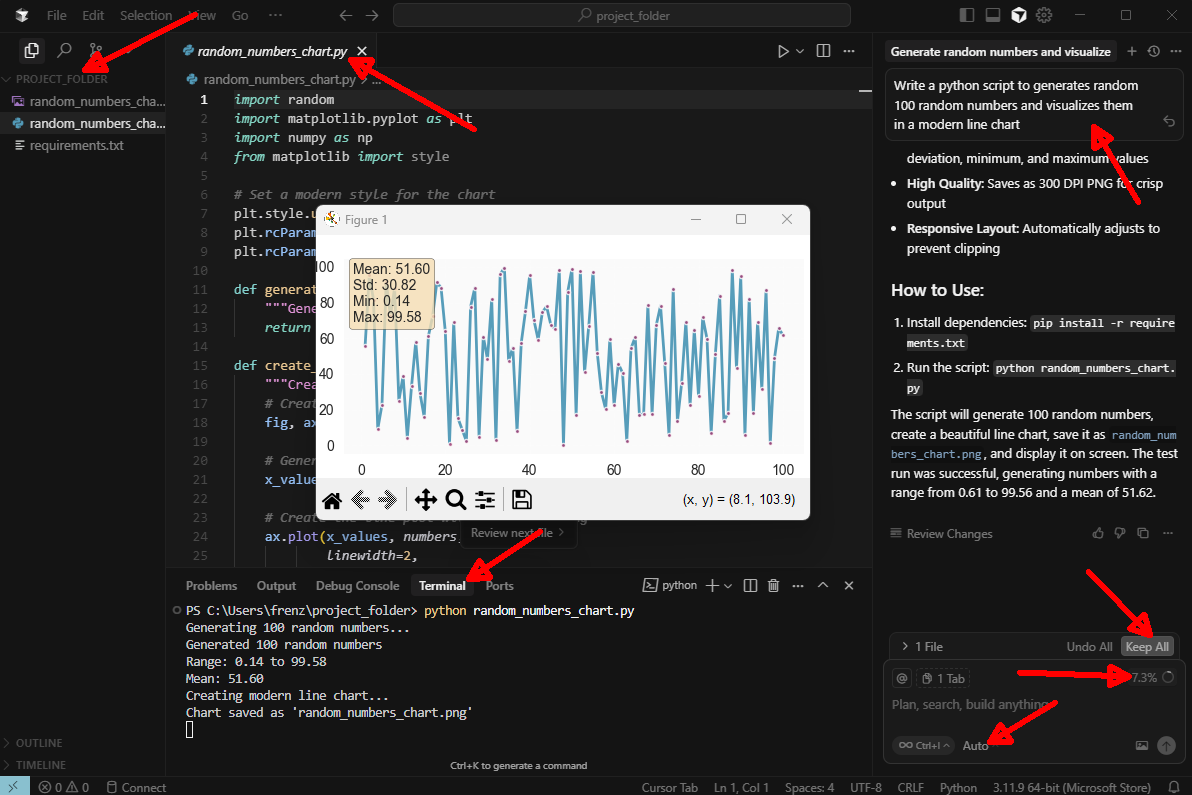
Key Interface Elements:
- Project Explorer (Left Panel): Displays your working directory and file structure for navigation between project files and folders
- AI Agent Panel (Right Side): Shows the current task description and provides context about what the AI is generating
- Code Editor (Center): Displays generated or edited code with syntax highlighting and IntelliSense support
- Terminal (Bottom): Executes generated scripts automatically, showing real-time output and error messages
- Agent Input Box (Bottom Right): Accepts natural language prompts that describe what you want to build
- Memory Icon: Maintains conversation history and project context for consistent AI assistance
- Keep All/Undo All Buttons: Enable approval or rejection of AI-generated changes before applying them to your project
Typical Workflow Example: The interface demonstrates a complete AI-assisted development cycle. A user requests “Generate random numbers and visualize them in a modern line chart.” Cursor responds by: 1. Creating a Python script using numpy, matplotlib, and random libraries 2. Automatically executing the script in the terminal 3. Generating a data visualization with statistical summaries 4. Saving the output as a high-quality PNG file
This seamless integration between natural language input, code generation, execution, and visualization makes Cursor particularly effective for real estate analytics tasks that require rapid prototyping and data visualization.
Preparing Your Analytics Environment
Development environments differ from production systems in purpose and configuration. Development environments enable experimentation, debugging, and iterative improvement. Production systems prioritize stability, security, and performance. Understanding this distinction prevents costly mistakes like testing code on live databases or sharing sensitive data through public repositories.
File organization determines project maintainability. Create consistent folder structures: /data for input files, /scripts for code, /output for results, /docs for documentation. This standardization enables AI tools to understand project layout and helps teammates navigate codebases. Version control concepts matter even without Git expertise. Save copies before major changes, document what changed and why, maintain backups of working versions.
project_name/
├── data/
│   ├── raw/           # Original, unprocessed data
│   ├── processed/     # Cleaned and transformed data
│   └── external/      # Third-party data sources
├── scripts/
│   ├── data_cleaning.py
│   ├── analysis.py
│   └── visualization.py
├── output/
│   ├── figures/       # Charts and graphs
│   ├── reports/       # Generated reports
│   └── models/        # Saved model files
├── docs/
│   ├── README.md
│   └── methodology.md
├── config/
│   └── settings.yaml  # API keys, database connections
└── requirements.txt   # Python dependencies
Prompt Engineering for Cursor
Effective interaction with Cursor requires structured communication that leverages its project-wide context awareness and code generation capabilities. Unlike general-purpose AI assistants, Cursor understands your entire codebase, file relationships, and data structures, enabling more sophisticated and contextually appropriate responses for data analytics workflows.
Data Analytics Context Specification: Start prompts by establishing the analytical context. Specify data sources, business objectives, and technical constraints. “Create a Python script that analyzes multifamily property performance using rent roll data from ‘q3_2024_rentrolls.csv’, calculates occupancy trends by unit type, and generates a dashboard showing key metrics with interactive charts.” This specificity enables Cursor to generate production-ready code that integrates with your existing project structure.
Iterative Refinement Process: Cursor excels at iterative development through its chat interface. Initial code generation provides a foundation, but follow-up prompts refine functionality: “Add error handling for missing rent data and create a summary table showing performance by property manager.” Each iteration builds upon the previous code, maintaining context and improving quality without starting from scratch.
Project Integration: Cursor’s memory system tracks conversation history and project context. Reference previous analyses: “Using the same data structure from the cap rate analysis, create a cash flow projection model.” This continuity enables building complex analytical workflows incrementally while maintaining consistency across related analyses.
Technical Specification: Include specific technical requirements for data analytics tasks. Specify libraries, output formats, and performance constraints: “Use pandas for data manipulation, matplotlib for visualization, and export results as both Excel and PDF formats with 300 DPI resolution for presentation quality.” This level of detail produces code that meets professional standards without requiring extensive modification.
Error Handling and Validation: Data analytics workflows require robust error handling. Prompt for comprehensive validation: “Add data quality checks for missing values, outliers, and data type consistency, with detailed logging of any issues found.” Cursor generates code that handles real-world data challenges common in real estate analytics.
Tool Selection and Security Considerations
Choosing between tools depends on task requirements and team capabilities. Excel remains optimal for ad-hoc analysis, financial modeling with circular references, and scenarios requiring immediate visual feedback. SQL excels at data extraction from large databases, complex joins across tables, and standardized reporting queries. Python handles everything else: API integrations, machine learning, web scraping, PDF generation, and workflow automation. R offers statistical depth for econometric analysis but has a smaller ecosystem for real estate-specific packages.
The decision framework considers data volume, analysis complexity, and reproducibility needs:
IF data fits in Excel (< 1 million rows) AND analysis is one-time THEN use Excel
ELSE IF data lives in databases AND need regular extracts THEN use SQL
ELSE IF analysis requires automation OR machine learning OR API integration THEN use Python
ELSE IF advanced statistics OR academic research THEN consider R
Security considerations shape development practices. Never hard-code passwords or API keys in scripts; use environment variables or configuration files excluded from sharing. Understand data sensitivity levels and compliance requirements for property information, tenant data, and financial records. AI co-pilots should never receive actual tenant names, social security numbers, or other personally identifiable information. Use synthetic data for development, real data only in secure production environments.
The Future of Analytics Work
The transformation from Excel analyst to code-enabled professional no longer requires years of study. AI co-pilots provide scaffolding that enables immediate productivity while gradually building understanding. Start with small automations: formatting reports, calculating standard metrics, generating charts. Each success builds confidence and reveals new possibilities.
The competitive advantage shifts from memorizing syntax to articulating clear requirements and validating AI-generated solutions. Real estate expertise matters more than programming proficiency when AI handles implementation details. Analysts who understand cap rate calculations, market dynamics, and investment strategies direct AI toward valuable solutions, while pure programmers without field knowledge generate technically correct but practically useless code.
This evolution democratizes advanced analytics, enabling smaller firms to compete through automation previously exclusive to large institutions. The analyst who embraces AI co-pilots multiplies their impact, transforming from report producer to solution architect. The future belongs not to those who code best, but to those who best direct AI toward solving real business problems. This collaboration between human expertise and artificial intelligence will define analytical careers for the next decade.
References
GitHub. (2024). Under the hood: Exploring the AI models powering GitHub Copilot. The GitHub Blog. https://github.blog/ai-and-ml/github-copilot/under-the-hood-exploring-the-ai-models-powering-github-copilot/
OpenAI. (2024). Best practices for prompt engineering with the OpenAI API. OpenAI Help Center. https://help.openai.com/en/articles/6654000-best-practices-for-prompt-engineering-with-the-openai-api
Lakera. (2025). The ultimate guide to prompt engineering in 2025. Lakera Blog. https://www.lakera.ai/blog/prompt-engineering-guide
Builder.io. (2025). Cursor vs GitHub Copilot: Which AI coding assistant is better? https://www.builder.io/blog/cursor-vs-github-copilot
Dunlop, C. (2025). Is Cursor better than VS Code with Copilot? Absolutely and it’s not close. Medium. https://medium.com/realworld-ai-use-cases/is-cursor-better-than-vs-code-with-copilot-absolutely-and-its-not-close-180b08d163f8
© 2025 Prof. Tim Frenzel. All rights reserved. | Version 1.1.2